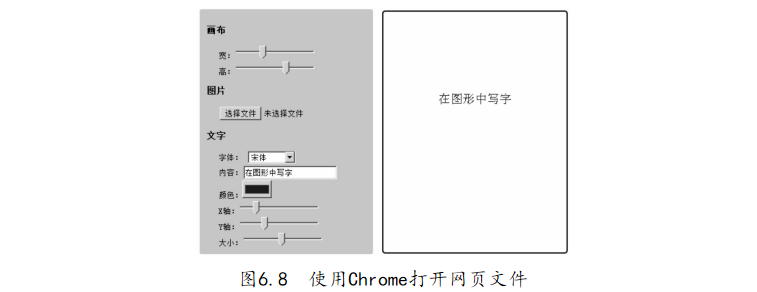
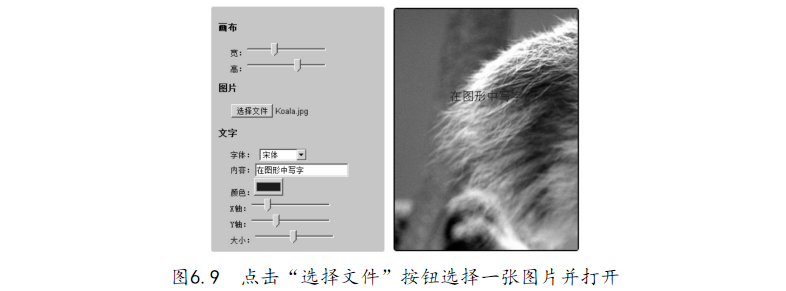
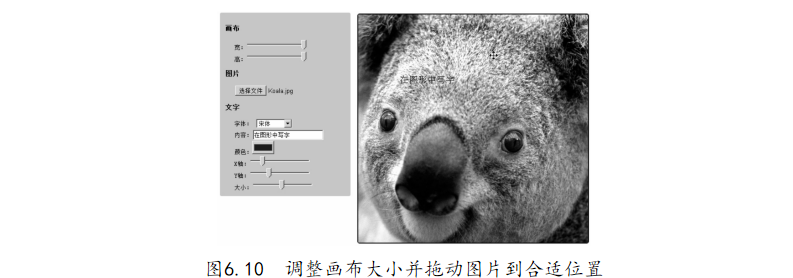
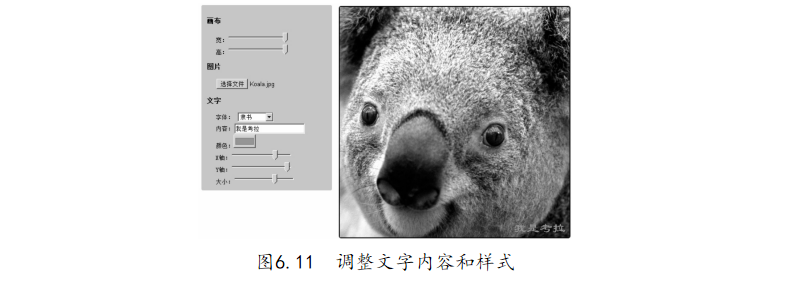
利用編輯器打開“6-5.在圖形中寫字.html”文件,代碼如下:【代碼6-5】
01 <! DOCTYPE HTML> 02 < html> 03 < head> 04 < style> 05 ul /* 畫布 調(diào)節(jié) 區(qū) 樣式 */ 06 { 07 float: left; 08 list- style: none; 09 font- size: 13px; 10 border: 1px solid #cccc99; 11 border- radius: 3px; 12 -moz- border- radius: 3px; 13 -webkit- border- radius: 3px; 14 background- color: #cccc99; 15 padding: 10px; 16 } 17 hr{ clear: both; } 18 canvas /* 畫布 樣式 */ 19 { 20 border: 2px solid black; 21 float: left; 22 margin: 15px; font- family: 23 border- radius: 5px; 24 -moz- border- radius: 5px; 25 -webkit- border- radius: 5px;
26 } 27 .item /* 調(diào)節(jié) 區(qū) 元素 行 樣式 */ 28 { 29 padding- left: 20px; 30 } 31 </ style> 32 </ head> 33 < body> 34 < header>< h2> 在 圖形 中 寫字</ h2></ header> 35 < section> 36 <!-- 矩形 Canvas 畫布 設(shè)置 區(qū) --> 37 < ul> 38 < li>< h3> 畫布</ h3></ li> 39 <!-- 畫布 長(zhǎng)寬 調(diào)節(jié) 區(qū) --> 40 < li class=" item"> 寬:< input id=" width_ canvas" type=" range" min=" 200" max=" 500" value=" 300" 41 step=" 1" /></li> 42 < li class=" item"> 高:< input id=" height_ canvas" type=" range" 43 min=" 200" max=" 500" value=" 395" step=" 1" /></li> 44 < li>< h3> 圖片</ h3></ li> 45 <!-- 圖片 選擇 區(qū) --> 46 < li class=" item">< input id=" file_ img" type=" file" value=" 在 圖形
中 寫字" /></li> 47 <!-- 文字 設(shè)置 區(qū) --> 48 < li>< h3> 文字</ h3></ li> 49 < li class=" item"> 字體: 50 < select id=" family_ font"> 51 < option value=" 宋體"> 宋體</ option> 52 < option value=" 黑體"> 黑體</ option> 53 < option value=" 幼 圓"> 幼 圓</ option> 54 < option value=" 微軟 雅 黑"> 微軟 雅 黑</ option> 55 < option value=" 楷體"> 楷體</ option> 56 < option value=" 隸書"> 隸書</ option> 57 < option value=" 方正 姚 體"> 方正 姚 體</ option> 58 < option value=" 方正 舒 體"> 方正 舒 體</ option> 59 < option value=" 華文 彩云"> 華文 彩云</ option> 60 </ select> 61 </ li> 62 < li class=" item"> 內(nèi)容:< input id=" text_ font" value=" 在 圖形 中 寫字" maxlength= 16 /></li> 63 < li class=" item"> 顏色:< input id=" color_ font" type=" color" value="# 0000ff" /></li> 64 < li class=" item"> X 軸:< input id=" x_ font" type=" range" min=" 0" max=" 500" value=" 90" step=" 1"
65 /></li> 66 < li class=" item"> Y 軸:< input id=" y_ font" type=" range" min=" 0" 67 max=" 500" value=" 150" step=" 1" /></li> 68 < li class=" item"> 大?�。?lt; input id=" size_ font" type=" range" 69 min=" 1" max=" 40" value=" 20" step=" 1" /></li> 70 </ ul> 71 <!-- 矩形 Canvas 畫布 --> 72 < canvas id=" canvas"></ canvas> 73 </ section> 74 </ body> 75 < script> 76 (function () { 77 var canvas = document. getElementById(' canvas'),// 獲取 Canvas 畫布 元素 78 context = canvas. getContext(" 2d"), // 獲取 Canvas 元素 上下文 79 width_ canvas = document. getElementById(' width_ canvas'),// 畫布 寬 80 height_ canvas= document. getElementById(' height_ canvas'),// 畫布 長(zhǎng) 81 file_ img = document. getElementById(' file_ img'), // 圖片 選擇 82 text_ font = document. getElementById(' text_ font'),
// 文字 內(nèi)容 83 color_ font = document. getElementById(' color_ font'),// 文字 顏色 84 x_ font = document. getElementById(' x_ font'), // 文字 x 軸 坐標(biāo) 85 y_ font = document. getElementById(' y_ font'), // 文字 y 軸 坐標(biāo) 86 size_ font = document. getElementById(' size_ font'), // 文字 大小 87 family_ font = document. getElementById(' family_ font'),// 文字 字體 88 img = new Image(); // 新建 圖片 元素 實(shí)例 89 function draw( e, x, y) { // 繪制 圖片 和 文字 90 // 清空 畫布 指定 矩形 區(qū)域 內(nèi)容 91 context. clearRect( 0, 0, parseInt( canvas. width), parseInt( canvas. height)); 92 canvas. width = parseInt( width_ canvas. value); // 設(shè)置 畫布 寬 93 canvas. height = parseInt( height_ canvas. value); // 設(shè)置 畫布 高 94 context. drawImage( img, x || move_ x, y || move_ y);// 填充 圖片 到 畫布 95 context. fillStyle = color_ font. value; // 設(shè)置 文字 顏色
96 context. textAlign = 'left'; // 設(shè)置 文字 水平 對(duì)齊 方式 97 context. font = size_ font. value + "px " + family_ font. value; // 設(shè)置 文字 大小 和 字體 98 // 填充 文字 到 畫布 指定 區(qū)域 99 context. fillText( text_ font. value, parseInt( x_ font. value), parseInt( y_ font. value)); 100 }; 101 //綁 定 文字 內(nèi)容 文本 框 keyup 事件�, 當(dāng) 鍵盤 按鍵 釋放 時(shí) 觸發(fā) 102 text_ font. addEventListener(' keyup', draw, false); 103 // 綁 定數(shù) 值 區(qū)域 選擇 控 件 change 事件, 當(dāng) 數(shù)值 變化 時(shí) 觸發(fā) draw 函數(shù) 104 [color_ font, x_ font, y_ font, size_ font, width_ canvas, height_ canvas, family_ font]. forEach( function 105 (item) { 106 item. addEventListener(' change', draw, false); 107 }); 108 // 綁 定 圖片 load 事件���, 當(dāng) 圖片 加載 完畢 后 觸發(fā) 109 img. addEventListener(' load', draw, false); 110 //綁 定 長(zhǎng) 傳控 件 change 事件, 當(dāng) 路徑 發(fā)生 變化 時(shí) 觸發(fā) 111 file_ img. addEventListener(' change', function () { 112 var files = this. files, // 獲取 文件 列表 113 reader;
114 for (var i = 0, length = files. length; i < length; i++) { 115 if (files[ i]. type. toLowerCase(). match(/ image.*/)) { // 正 則 判斷 文件 類型 是否 為 圖片 類型 116 reader = new FileReader(); // 實(shí)例 化 FileReader 對(duì)象 117 reader. addEventListener(' load', function (e) { // 監(jiān)聽 FileReader 實(shí)例 的 load 事件 118 img. src = e. target. result; // 設(shè)置 圖片 內(nèi)容 119 }); 120 reader. readAsDataURL( files[ i]);// 讀取 圖片 文件 為 dataURI 格式 121 canvas. style. cursor = 'move'; // 設(shè)置 光標(biāo) 為 移動(dòng) 樣式 122 break; 123 }; 124 }; 125 }, false); 126 var move_ x = 0, move_ y = 0; // 臨時(shí) 存儲(chǔ) 圖片 x�、 y 軸 偏移量 127 function canvas_ mousemove( e) { // 當(dāng) 鼠標(biāo) 拖動(dòng) 圖片 時(shí) 觸發(fā) 128 // 計(jì)算 圖片 拖動(dòng) 后的 x 軸 位置 129 move_ x = e. clientX - canvas.$ mousedown_ x + canvas.$ mouseup_
130 // 計(jì)算 圖片 拖動(dòng) 后的 y 軸 位置 131 move_ y = e. clientY - canvas.$ mousedown_ y + canvas.$ mouseup_ move_ y; 132 // 按照 計(jì)算 后的 坐標(biāo) 位置 重新 繪制 圖片 和 文字 133 draw( null, move_ x, move_ y); 134 }; 135 canvas. addEventListener(' mousedown', function (e) { // 當(dāng) 鼠標(biāo) 點(diǎn)擊 畫布 區(qū)時(shí) 觸發(fā) 136 if (img. src. length) { // 判斷 畫布 區(qū)內(nèi) 是否 已經(jīng) 存在 圖片 137 canvas.$ mousedown_ x = e. clientX; // 緩存 當(dāng)前 鼠標(biāo) x 軸 坐標(biāo) 138 canvas.$ mousedown_ y = e. clientY; // 緩存 當(dāng)前 鼠標(biāo) y 軸 坐標(biāo) 139 // 監(jiān)聽 畫布 區(qū) 鼠標(biāo) 拖動(dòng) 事件 140 canvas. addEventListener(' mousemove', canvas_ mousemove, false); 141 }; 142 }, false); 143 document. addEventListener(' mouseup', function (e) { // 當(dāng) 鼠標(biāo) 在 文檔 內(nèi) 釋放 后 觸發(fā) 144 canvas.$ mouseup_ move_ x = move_ x; // 緩存 拖動(dòng) 后 圖片 x 軸 坐標(biāo) 145 canvas.$ mouseup_ move_ y = move_ y; // 緩存 拖動(dòng) 后 圖片 y 軸 坐標(biāo) 146 // 移 除 對(duì) 畫布 鼠標(biāo) 拖動(dòng) 監(jiān)聽 事件
147 canvas. removeEventListener(' mousemove', canvas_ mousemove, false); 148 }, false); 149 // 阻止 文檔 內(nèi)容 選擇 事件�, 避免 拖動(dòng) 時(shí) 觸發(fā) 內(nèi)容 選擇 造成 不便 150 document. addEventListener(' selectstart', function (e) { e. preventDefault() }, false); 151 draw(); // 繪制 默認(rèn) 內(nèi)容 152 })(); 153 </ script> 154 </ html>