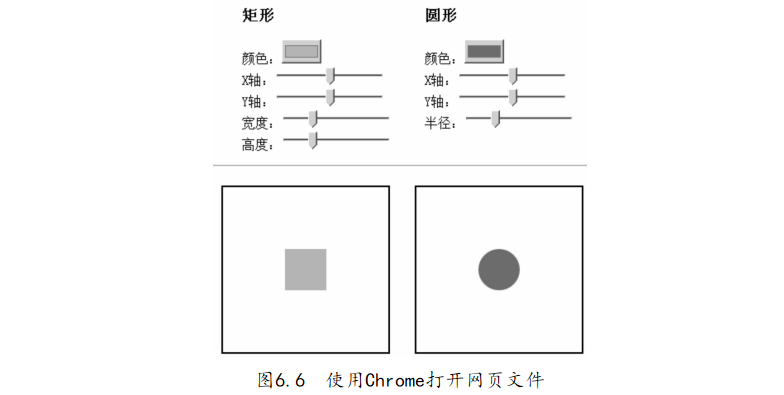
利用編輯器打開(kāi)“6-4.繪制圖形:矩形和圓形.html”文件����,代碼如下:
【代碼6-4】
01 <! DOCTYPE HTML> 02 < html> 03 < head> 04 < style> 05 ul{ float: left; list- style: none; } 06 hr{ clear: both; } 07 canvas{ border: 2px solid black; float: left; margin: 15px;
15px; } 08 </ style> 09 </ head> 10 < body> 11 < header>< h2> 繪制 圖形: 矩形 和 圓形</ h2></ header> 12 <!-- 矩形 Canvas 畫(huà)布 設(shè)置 區(qū) --> 13 < ul> 14 < li>< h3> 矩形</ h3></ li> 15 < li> 顏色:< input id=" color_ rect" type=" color" value="# eabb02" /></li> 16 < li> X 軸:< input id=" x_ rect" type=" range" min=" 0" max=" 150" value=" 75" step=" 1" /></li> 17 < li> Y 軸:< input id=" y_ rect" type=" range" min=" 0" max=" 150" value=" 75" step=" 1" /></li> 18 < li> 寬度:< input id=" width_ rect" type=" range" min=" 0" max=" 200" value=" 50" step=" 1" /></li> 19 < li> 高度:< input id=" height_ rect" type=" range" min=" 0" max=" 200" value=" 50" step=" 1" /></li> 20 </ ul> 21 <!-- 圓形 Canvas 畫(huà)布 設(shè)置 區(qū) -->
22 < ul> 23 < li>< h3> 圓形< h3></ li> 24 < li> 顏色:< input id=" color_ circle" type=" color" value="# 506cc0"/></ li> 25 < li> X 軸:< input id=" x_ circle" type=" range" min=" 0" max=" 200" value=" 100" step=" 1" /></li> 26 < li> Y 軸:< input id=" y_ circle" type=" range" min=" 0" max=" 200" value=" 100" step=" 1" /></li> 27 < li> 半徑:< input id=" radius_ circle" type=" range" min=" 0" max=" 100" value=" 25" step=" 1" /></li> 28 </ ul> 29 < hr /> 30 <!-- 矩形 Canvas 畫(huà)布 --> 31 < canvas id=" canvas_ rect" width=" 200" height=" 200"></ canvas> 32 <!-- 圓形 Canvas 畫(huà)布 --> 33 < canvas id=" canvas_ circle" width=" 200" height=" 200"></ canvas> 34 </ body> 35 < script> 36 (function () { 37 // 獲取 矩形 Canvas 畫(huà)布 繪圖 上下文
38 var content_ rect = document. getElementById(' canvas_ rect') .getContext(" 2d"), 39 // 獲取 圓形 Canvas 畫(huà)布 繪圖 上下文 40 canvas_ circle = document. getElementById(' canvas_ circle') .getContext(" 2d"); 41 function draw_ rect() { // 獲取 控 件數(shù) 據(jù) 繪制 矩形 42 content_ rect. clearRect( 0, 0, 300, 300); // 清空 給定 矩形 43 content_ rect. fillStyle = color_ rect. value; // 填充 矩形 畫(huà)布 原色 44 content_ rect. fillRect( // 填充 矩形 45 parseInt( x_ rect. value), // 矩形 左 上角 的 x 坐標(biāo) 46 parseInt( y_ rect. value), // 矩形 左 上角 的 y 坐標(biāo) 47 parseInt( width_ rect. value), // 矩形 的 寬度, 以 像素 計(jì) 48 parseInt( height_ rect. value) // 矩形 的 高度�����, 以 像素 計(jì) 49 ); 50 };
51 var color_ rect = document. getElementById(' color_ rect'), // 獲取 矩形 顏色 選擇 元素 52 x_ rect = document. getElementById(' x_ rect'),// 獲取 矩形 x 軸 滑 塊 元素 53 y_ rect = document. getElementById(' y_ rect'),// 獲取 矩形 y 軸 滑 塊 元素 54 width_ rect = document. getElementById(' width_ rect'), // 獲取 矩形 寬度 滑 塊 元素 55 height_ rect = document. getElementById(' height_ rect'); // 獲取 矩形 高度 滑 塊 元素 56 // 循環(huán) 矩形 設(shè)置 元素, 綁 定數(shù) 據(jù) 變更 change 事件 57 [color_ rect, x_ rect, y_ rect, width_ rect, height_ rect]. forEach( function (item) { 58 item. addEventListener(' change', draw_ rect, false); 59 }); 60 draw_ rect(); // 繪制 默認(rèn) 矩形 61 function draw_ circle() { // 獲取 控 件數(shù) 據(jù) 繪制 圓形 62 canvas_ circle. clearRect( 0, 0, 300, 300); // 清空 給定 矩形 63 canvas_ circle. fillStyle = color_ circle. value; //
// 填充 矩形 畫(huà)布 原色 64 canvas_ circle. beginPath(); // 起始 一條 路徑 65 canvas_ circle. arc( // 創(chuàng)建 圓形 66 parseInt( x_ circle. value), // 圓的 中心 的 x 坐標(biāo) 67 parseInt( y_ circle. value), // 圓的 中心 的 y 坐標(biāo) 68 parseInt( radius_ circle. value), // 圓的 半徑 69 0, // 起始 角��, 以 弧度 計(jì) 70 2 * Math. PI, // 結(jié)束 角����, 以 弧度 計(jì) 71 true // 逆時(shí)針 或 順時(shí)針 繪圖 72 //( false: 順時(shí)針���, true: 逆時(shí)針) 73 ); 74 canvas_ circle. closePath(); // 創(chuàng)建 從 當(dāng)前 點(diǎn) 回到 起 始點(diǎn) 的 路徑 75 canvas_ circle. fill(); // 填充 當(dāng)前 繪圖 76 }; 77 var color_ circle = document. getElementById(' color_ circle'),
circle'), // 獲取 圓形 顏色 選擇 元素 78 x_ circle = document. getElementById(' x_ circle'), // 獲取 圓形 x 軸 滑 塊 元素 79 y_ circle = document. getElementById(' y_ circle'), // 獲取 圓形 y 軸 滑 塊 元素 80 radius_ circle = document. getElementById(' radius_ circle'); // 獲取 圓形 半徑 滑 塊 元素 81 // 循環(huán) 圓形 設(shè)置 元素��, 綁 定數(shù) 據(jù) 變更 change 事件 82 [color_ circle, x_ circle, y_ circle, radius_ circle]. forEach( function (item) { 83 item. addEventListener(' change', draw_ circle, false); 84 }); 85 draw_ circle(); // 繪制 默認(rèn) 圓形 86 })(); 87 </ script> 88 </ html>