視頻類APP開發(fā)是怎樣解決添加視頻進(jìn)度條的��?深圳APP開發(fā)公司本例將完成給自定義播放器添加進(jìn)度條的工作�����。一共會添加兩種進(jìn)度條,分別為下載進(jìn)度條和播放進(jìn)度條����。使用Chrome瀏覽器打開網(wǎng)頁文件,點(diǎn)擊屏幕中央的三角播放按鈕���,播放器底部出現(xiàn)自定義工具條�����,同時進(jìn)度條慢慢地向右伸長�,運(yùn)行效果如圖3.7所示����。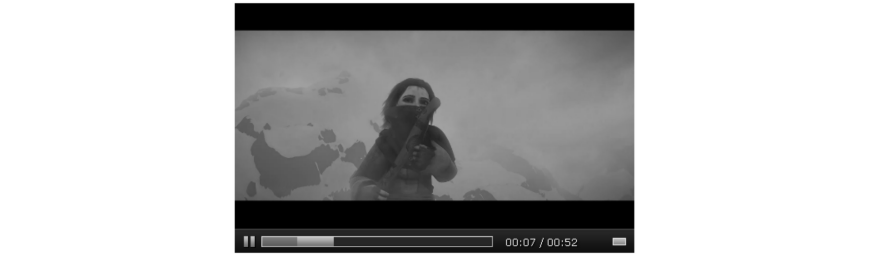
圖3.7中的藍(lán)色進(jìn)度條表示播放時間��,灰色條表示視頻下載進(jìn)度���。將鼠標(biāo)懸浮于進(jìn)度條之上,此時進(jìn)度條上方會出現(xiàn)對應(yīng)的時間提示框����,效果如圖3.8所示。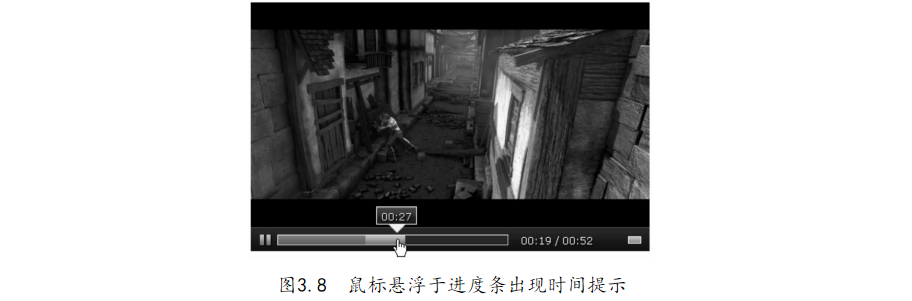
本例的代碼構(gòu)建在“3-5.添加視頻進(jìn)度條.html”的功能基礎(chǔ)之上��。下面對增添的代碼部分做一個分析�。字符串模板CONTROLS_HTML增加進(jìn)度條HTML結(jié)構(gòu),代碼如下:
'<div class=" control progress_ control">' + // 進(jìn)度 條 外圍 層 '<div class=" progress_ bar_ bg"></ div>' + // 進(jìn)度 條 背景 層 '<div class=" progress_ bar_ buffered"></ div>' + //
// 下載 進(jìn)度 條 層 '<div class=" progress_ bar_ played"></ div>' + // 播放 進(jìn)度 條 層 '<div class=" progress_ bar_ time">' + // 懸浮 提示 外圍 層 '<div class=" progress_ bar_ time_ line"></ div>' + '<div class=" progress_ bar_ time_ txt"> 00: 00</ div>' + // 懸浮 時間 提示 '</div>' + '</div>' +
APP開發(fā)公司提示HTML模板對應(yīng)的CSS可以參考源碼�����。視頻工具類VideoControl的prototype原型上增加_progress和_bartime方法����。其中_progress方法用于控制下載進(jìn)度條的移動,代碼如下:
_progress: function () { // 控制 下載 進(jìn)度 條 var self = this, video = self. video, // 實(shí)例 上 的video 屬性 video_ ele = video. get( 0), // 視頻 的 原生 元素 progress_ bar = self. wraper. find(' div. progress_ control'), // 進(jìn)度 條 外圍 元素 progress_ bar_ buffered = self. wraper. find(' div. progress_ bar_ buffered');// 下載 進(jìn)度 條 元素 video. on({ 'progress': function (e) { // 監(jiān)聽 video 的 下載 進(jìn)度 事件 if (this. buffered && this. buffered. length) { // 判斷 是否 開始 接收 數(shù)據(jù) var percent = video_ ele. buffered. end( 0) / video_ ele. duration; // 下載 數(shù)據(jù) 相對 總 時間 百分比 progress_ bar_ buffered. width( percent * progress_ bar. width()); // 設(shè)置 下載 進(jìn)度 條 長度 }; } }); },
video的buffered屬性返回1個TimeRanges對象���。TimeRanges對象表示音視頻的已緩沖部分�,對象具有1個length屬性��,表示音視頻中已緩沖范圍的數(shù)量�����,同時還具有兩個方法���,即start和end����,語法如下:
video. buffered. start( index); // 獲得 某個 已 緩沖 范圍 的 開始 位置 video. buffered. end (index); // 獲得 某個 已 緩沖 范圍 的 結(jié)束 位置
_bartime方法用于實(shí)現(xiàn)鼠標(biāo)懸浮進(jìn)度條的時間提示�,代碼如下:
_bartime: function () { // 鼠標(biāo) 懸浮 進(jìn)度 條 的 時間 提示 var wraper = this. wraper, progress_ control = wraper. find(' div. progress_ control'),// 進(jìn)度 條 外圍 元素 progress_ bar_ bg = wraper. find(' div. progress_ bar_ bg'), // 進(jìn)度 條 背景 層 progress_ bar_ time = wraper. find(' div. progress_ bar_ time'), // 時間 懸浮 提示 層 外框 progress_ bar_ time_ txt = wraper. find(' div. progress_ bar_ time_ txt'), video_ ele = this. video. get( 0); // 懸浮 提示 時間 元素 progress_ bar_ bg. on({ // 綁 定 進(jìn)度 條 背景
'mousemove': function (e) { var offsetX = e. clientX - progress_ bar_ bg. offset(). left, // 相對于 進(jìn)度 條 橫軸 距離 percent = offsetX / progress_ bar_ bg. width(); progress_ bar_ time. css(' left', offsetX + 6); // 設(shè)置 時間 浮動 框 位置 progress_ bar_ time_ txt. html( timeFormat(( percent * video_ ele. duration)|| 0)); }, 'mouseenter': function (){ progress_ bar_ time. show(); },// 移入 顯示 時間 提醒 'mouseleave': function (){ progress_ bar_ time. hide(); }// 移出 隱藏 時間 提醒 }); }
最后,完成播放進(jìn)度條的動態(tài)更新功能��,修改原型方法_timeupdate�,代碼如下:
this. video. on({ 'timeupdate': function () { // 視頻 播放 位置 變動 時 觸發(fā) currentTime. html( timeFormat( video. currentTime)); // 當(dāng)前
播放 時間 動態(tài) 更新 var percent = video. currentTime / video. duration; // 播放 時間 占 總 時間 百分比 progress_ bar_ played. width( percent * progress_ bar. width()); // 設(shè)置 播放 進(jìn)度 條 寬度 }, 'loadedmetadata': function () { // 視頻 元 數(shù)據(jù) 加載 完畢 后 觸發(fā) duration. html( timeFormat( video. duration)); } });
在上面的代碼中,將之前監(jiān)聽video的play事件換為loadedmetadata事件����,是為了保證視頻的元數(shù)據(jù)下載完畢后再設(shè)置視頻總耗時,避免在play事件觸發(fā)時獲取video的duration屬性為空�。提示視頻的元素?fù)?jù)包含時長、尺寸(僅視頻)以及文本軌道等信息�����。好了,APP開發(fā)公司本文關(guān)于“視頻類APP開發(fā)是怎樣解決添加視頻進(jìn)度條的”的相關(guān)APP制作知識我們就分享到這里�����,謝謝關(guān)注�,博納網(wǎng)絡(luò)編輯整理。